Turn it on!
SETTINGS›SAMPLING AND RECORDING›INPUT RECALL: ON
Input Recall is off at firstIn Settings, in the Sampling and Recording group, set the Input Recall row to On with − and +While it is on, DFOS keeps the last 25 seconds of what comes in
Quick start
DFOS can bring back something you did not record on purpose: the last seconds of input, the notes you played, or a stored mix of effects. The full details are in the manual. All quick start guides
Input Recall is off at firstIn Settings, in the Sampling and Recording group, set the Input Recall row to On with − and +While it is on, DFOS keeps the last 25 seconds of what comes in
From any page, SHIFT and SAMPLE RECORD put those 25 seconds on the selected pad if it is empty, or else on the next empty pad after it on the trackThe sample is named Recall 001, 002 and on, and the pad is selectedIt is one undo
"Input Recall is off: see Settings" means the row is still Off"Nothing to recall" means nothing came in"No empty pad on this track" means every pad of the track holds a sound
Play the pads while DFOS is not recording. DFOS remembers what you played, the last 64 notes at most.
SHIFT and SEQ RECORD put the notes you played during the last time round the loop into the sequence, on the tracks they were played onWith Settings > Record Quantize on they snap to the TC valueDFOS says how many notes it recalled; with none it says "Nothing to recall"Undo takes them out
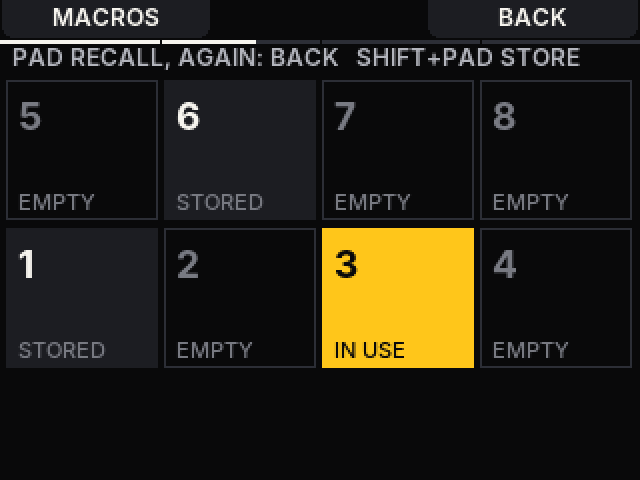
KNOB FX, then B2, opens Snapshots: eight stored states of the effectsSHIFT and a pad store one, and a pad recalls it; the same pad again goes backThe fader morphs between the mix as it was and the snapshotStoring and recalling are not steps for Undo
Settings > Performing > Snapshot Glide makes a snapshot recall arrive over a beat, one bar, two bars or four bars. It is Off at first, so a recall is at once.