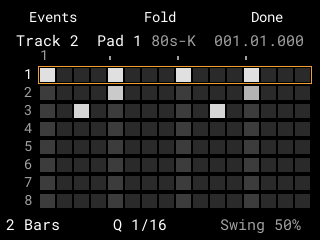
The Grid
A step editor for every track: the pads are the steps, a lane for each pad, length, Q, swing, Chance and Humanize, and the event list.
In the manual →For the Akai MPC Sample · stock OS 1.3.0.12
16 tracks, a step Grid, a Mixer with effects and a better sample browser, built into the MPC Sample's own OS.
Stock's printed functions stay where they are. DFOS adds its pages beside them, reached with STOP + pad, SHIFT + B3 and a few more presses.
A step editor for every track: the pads are the steps, a lane for each pad, length, Q, swing, Chance and Humanize, and the event list.
In the manual →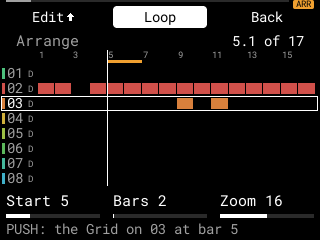
128 sequences of DFOS's own, a Song page that plays them in order, and an Arranger timeline with automation of level, pan, sends and inserts.
In the manual →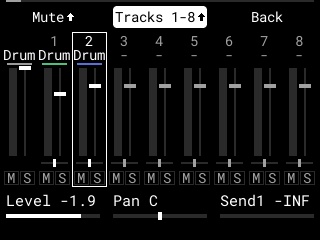
A strip for each track and one for stock's sound, delay and reverb returns, submixes, and the Main strip.
In the manual →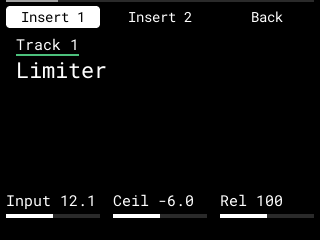
Four insert slots on every track, submix, return and Main, with DFOS's own effects and presets, and a CPU guard that refuses an effect the MPC has no room for.
In the manual →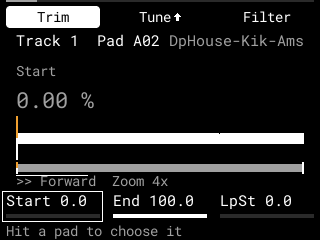
Each pad's trim, loop, envelopes, filter and tail; up to 8 layers a pad and two LFOs with four mod slots.
In the manual →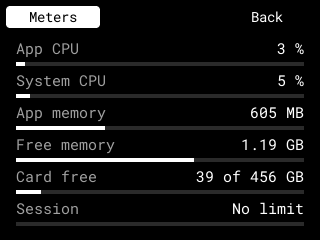
A tuner for the input, a page of the MPC's CPU, memory and card space, and the main mix's loudness after EBU R 128.
In the manual →Drum tracks of 128 pads in banks A to H, played on stock's beat and saved in stock's own project. A track without notes can become a MIDI, Audio or Keygroup track.
In the manual →Favourites, tags, the Sample Pool, previews with their own tune and start, and Expansions shown as covers.
In the manual →The pads play chromatic notes, a scale, chords or progressions on a drum, MIDI or keygroup track, with an arpeggiator.
In the manual →The whole output, one pad's sound or each track, written as new WAVs on the card.
In the manual →DFOS is being built now. Some parts pass DFOS's own tests but haven't run on the MPC yet; the manual marks each one.
A walk through DFOS on the MPC Sample.
Video coming soon
Download coming soon — the release is being finished.
You need an MPC Sample on the stock OS 1.3.0 and a microSD card (exFAT) with DFOS. Nothing goes into the MPC's internal storage.
Built from the same text as the PDFs, so all three always agree.