Open the Looper!
SHIFT+B3›LOOPERorSAMPLE RECORD›PUSH
SHIFT and B3 open the Menu, where Looper is one of the pagesOn Sample Record, PUSH opens itB3 goes back, and the loops keep playing
Quick start
The Looper holds four loops of the input that play side by side, each with its own length and level. The full details are in the manual. All quick start guides
SHIFT and B3 open the Menu, where Looper is one of the pagesOn Sample Record, PUSH opens itB3 goes back, and the loops keep playing
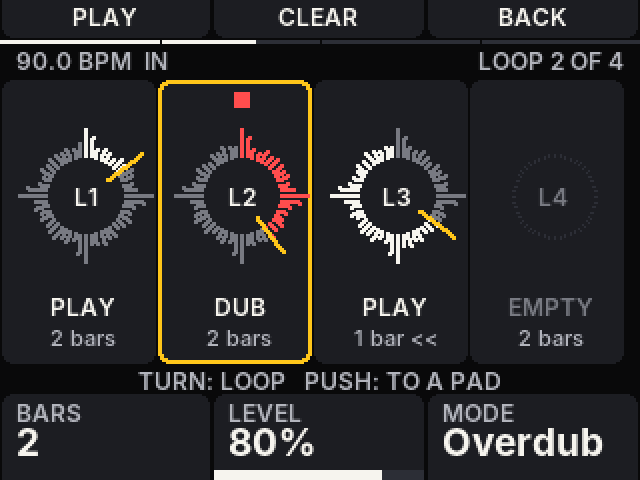
The encoder, − and + choose one of the four loops, L1 to L4The buttons and knobs work on itK1 sets its length in bars: 1, 2, 4 or 8
B1 on an empty loop records it for its bars, then it plays by itselfThe button's label names what it does nextA loop is made of what comes in through an input, never of DFOS's own sound
Choose another loop and press B1A second, third or fourth loop starts recording the moment the first comes round to its start, so the loops lie on each other
B1 on a playing loop starts the overdub, and B1 again returns to playK3 chooses what an overdub does: Overdub adds what comes in to the loop, Replace writes over it
K2 is the chosen loop's levelK1 on a loop that is there changes its length: fewer bars play its first bars, more bars go on in silence for you to overdub into
SHIFT and B1 put the loop back as it was before the last overdubPressing them again brings the overdub backStop overdubbing first
SHIFT and B2 play the loop backwards, and again forwardsThe loop must be playing or overdubbingThe page marks a reversed loop with <<
B2 clears the chosen loop and the others play on.
STOP stops all the loops where they are, and PLAY starts them together from their beginnings. The sequence is left as it is.
SHIFT and B3 step the input: the rear input, the microphone or USB, shown beside the tempoSHIFT and K3 switch Monitor, Off at the left, Auto at the rightIt is the same setting as on Sample Record, and reads On when Sample Record has it ON
SHIFT and K1 switch a metronome click on the beats of the first loop that runsSHIFT and K2 switch the count-in: with the transport stopped, the first loop is recorded after one bar of clicks
PUSH puts a copy of the playing loop, as you hear it, on the first free pad of the track. It is an ordinary sample from then on.