The idea!
SAMPLE›B1
A pad holds up to eight sounds: its own and seven layers. Layer play chooses which of them a hit plays, so repeated hits do not sound the same.
Quick start
Layer play is new and tested on a computer only: it is beta, so tell us how it feels on your unit. The full details are in the manual. All quick start guides
A pad holds up to eight sounds: its own and seven layers. Layer play chooses which of them a hit plays, so repeated hits do not sound the same.
Select the pad and press SAMPLE. Press B2 again and again: Tune, Play, P Env, Artic, Stack, then L Part.
K1 is where the shown layer's sample starts playingK2 where it endsK3 is that layer's panSHIFT and K1 choose how a hit picks a sound
Load the first snare onto the pad as usual. It is layer 1, the pad's own sound.
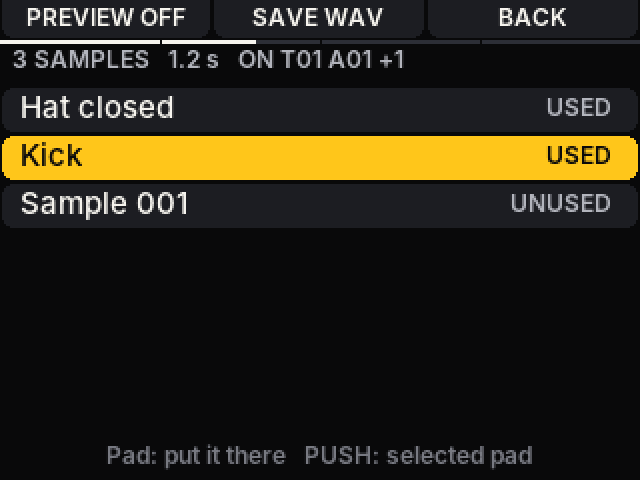
The Sample Pool lists only the samples the project already holds. Load each other snare onto a spare pad first, if it is not there yet.
On the Sample page press B1 until the tab reads Layer. Hold SHIFT and turn K1 to choose the layer, for example 2 of 8.
Open the Sample Pool, select the second snare and press SHIFT and PUSHIt goes onto the layer you choseDo the same for layers 3 and 4
Back on the Sample page press B2 until L Part. Hold SHIFT and turn K1 to Cycle.
Each hit plays the next snare in turn. The choice can be undone and is saved with the project.
Every layer whose velocity range holds the hit playsSounds stackThis is how DFOS has always played layers
One sound a hit, in turn, whatever the velocity.
One sound a hit, picked at random.
At random, but never the same sound twice running.
In Cycle, Random and No repeat the velocity ranges are ignored and exactly one sound plays a hitOn a pad with no layers, choosing a mode says so on the screen
On the Layer tab K1, K2 and K3 are the shown layer's level, its tuning and the velocity it joins in from.
Pad 1 plays the selected pad with all its layersPads 2 to 8 silence or bring back layers 2 to 8 while you listenThat is not an edit
A Keygroup track has the same four modes on its own Layers page: SHIFT and B2 on Zones. That page is unchanged.