Quick start
Use the Menu and Settings, in panels
The Menu opens the eight main pages. Settings holds every choice about how DFOS looks and behaves, in groups, and saves them for you. The full details are in the manual. All quick start guides
The Menu and Settings
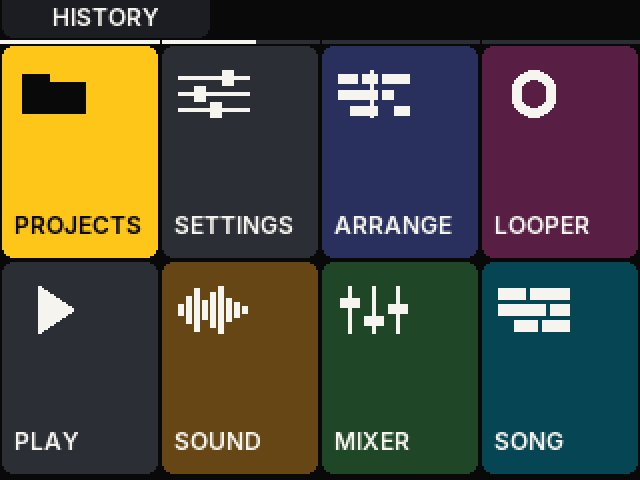
Open the Menu!
SHIFT and B3 open the Menu from most pagesThe encoder, − and + go along the top row and then the bottom one, and pads 1 to 4 are the lower tiles and 5 to 8 the upper onesPress a pad to mark its tile; letting go opens itB1 is the undo history
What the tiles open!
PLAYSOUNDMIXERSONG
PROJECTSSETTINGSARRANGELOOPER
Play is the Main screen and Sound is Sample Mode. Mixer, Song, Projects, Settings, Arrange and Looper open the page of that name.
Change a setting!
STOP+PAD 7
TURN THE ENCODER›PUSH›−or+
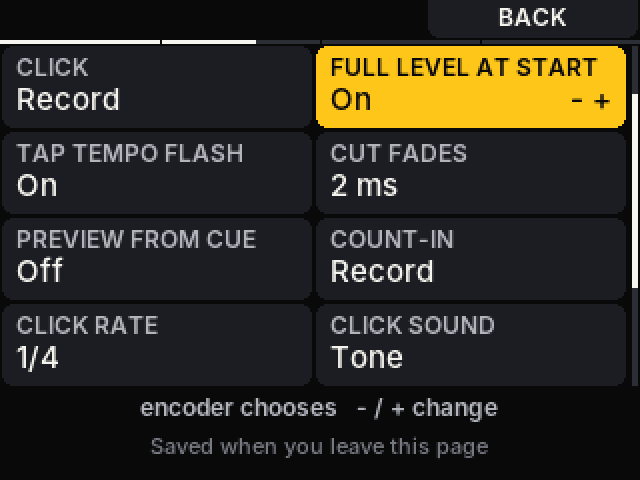
STOP and pad 7 open Settings, in groups: Screen, Pads and Buttons, Sequencer, Performing, Sampling and Recording, Browser and Preview, MIDI, USB and Export, Effect List, Effects One by One and ShortcutsThe encoder chooses, PUSH opens a group, − and + change a row, and B3 goes backChanges are saved when you leave the page
Settings to know
Messages!
Messages chooses which message boxes show: On (every message, which is how DFOS is first installed), Off or Only warningsA question that waits for B1 or B3 always shows, and with Only warnings so do refusals and what to do insteadMessage Time sets how long a box stays, 0.5 to 2.5 seconds, 1.0 as installedMessage Opacity, 0 to 100 %, fades the box so the page shows through itMessage Place puts it at the top, in the middle (as installed) or at the bottom
Look, Typeface and Brightness!
SCREEN›LOOKTYPEFACEBRIGHTNESS
Look has fifteen choices, and DFOS starts in BentoTypeface is Sans or Mono, Sans at firstBrightness is 1 to 6 for the backlight, 6 at first
Auto Save!
Auto Save is off at firstWith it on, the project is saved to its folder two seconds after the last changeA project that was never saved goes to one named Autosave and still counts as unsaved
Start With!
Start With chooses what DFOS starts from: Last Session, which is the first setting, brings back what you were working on, saved or not, with the page, pad and bank you were on, a waiting recording and the Looper's loops (stopped), also after a power-off from the Power sheet or a flat battery, and never changes your own project until you saveTemplate is a copy of the template you saved on Projects, and Empty an empty project at 88 BPMTested on a computer only
Top line!
The thin line under the top row shows how far through the sequence the playhead is, with a gap at each bar and, while stopped, a short mark where it standsThat is Sequence, which is how DFOS is first installedCPU shows the audio load as before, and Off hides the lineTested on a computer only
Count-In and Click!
Count-In is Off, Record (one bar of clicks before recording, as first installed) or Rec+Play (before playing too)Click is Off, Record or Play; Record clicks while recording, and Play clicks while playing tooSHIFT and pad 4 switch the count-in on and off
Record Quantize!
SEQUENCER›RECORD QUANTIZEorSHIFT+PAD 10
Record Quantize is on at first: recorded notes snap to the TC value on MainOff keeps them as you playedIt is the same switch as SHIFT and pad 10
Fader Controls!
PADS AND BUTTONS›FADER CONTROLSorSHIFT+PAD 9
Fader Controls is what the fader does on pages that give it no job of its own: a pad's level, pan or tune, a track's level or sends, or a macroIt is the track's level at firstSHIFT and pad 9 open the same choice as a list
Ask Before Erase Pad!
ERASE and a pad erases that pad's notes at once, and undo brings them backOn an audio track the pad's regions go and the pad is emptied, as one undoTurn Ask Before Erase Pad on, in Pads and Buttons, to be asked firstIt is off at first
MIDI Clock In!
MIDI, USB AND EXPORT›MIDI CLOCK IN
MIDI Clock In is off at firstTurn it on and DFOS follows another machine's MIDI clock: its tempo and its beat, Start, Continue, Stop and Song PositionNo count-in is playedIt listens on the ports MIDI In Port choosesTested on a computer only
Program Change and MIDI delay!
MIDI, USB AND EXPORT›PROG CHANGE INorMIDI OUT DELAY
Prog Change In is off at firstSequence makes program n pick sequence n; Track gives a plugin its preset n, or passes the message to a MIDI track's gearMIDI Out Delay holds back everything DFOS sends as MIDI, from 1 to 100 ms, so outside gear lines up with DFOS's soundTested on a computer only
Export Format!
MIDI, USB AND EXPORT›EXPORT FORMAT
Export Format is what mixdowns and stems are written as: WAV24 at first, or WAV16, WAV32F, AIFF24 or AIFF16, all at 44.1 kHz.
Shortcut maps
STOP and SHIFT with a pad!
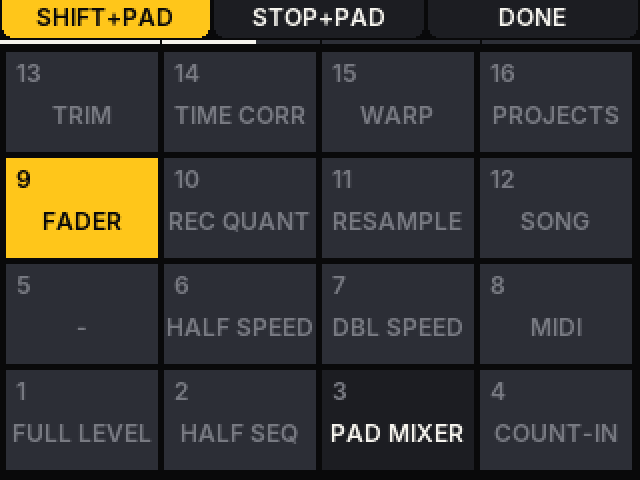
STOP and a pad open a page: 1 Menu, 2 Main, 3 Sample, 4 Mixer, 5 Song, 6 Grid, 7 Settings, 8 Next Sequence, 9 Tuner, 10 Meters, 11 Track Mute, 12 Track page, 13 MIDI Monitor, 14 Pad FX, 15 Locators and 16 Quick SaveHold STOP for half a second and the map showsSHIFT and a pad, where the pads play, runs a job: 1 Full Level, 4 count-in, 9 the fader's choice, 10 quantize and 16 Projects among them
Change the maps!
The last group of Settings, Shortcuts, opens both mapsB1 is the SHIFT and pad map and B2 the STOP and pad mapA pad chooses, the encoder changes its job, PUSH gives it back the job it was made with and B3 is doneShortcut Map, in Pads and Buttons, sets how long STOP is held before its map shows
More guides